Why Face Recognition Matters
“Can AI identify whether two photos belong to the same person?”
Imagine you’re working in a bank’s Financial Crime team.
A customer’s passport has triggered a possible match against a Politically Exposed Person (PEP) screening system.
The names are similar.
But are they actually the same person?
Making the wrong decision could either:
- Delay an innocent customer’s onboarding, or
- Allow a high-risk individual to pass through screening.
This is where AI-powered face recognition can help—not by making the final decision, but by providing additional evidence for human investigators.
In this tutorial, we’ll build a complete face verification pipeline using Python and InsightFace.
By the end of this project, you’ll understand how modern face recognition systems work and build one yourself in Google Colab.
Important: This project is designed for identity verification and educational purposes. It should never be used as the sole basis for security, legal, or compliance decisions. Human review remains essential.
What You’ll Build
By the end of this tutorial, you’ll know how to:
✅ Load facial recognition models
✅ Detect faces in images
✅ Assess image quality
✅ Generate facial embeddings
✅ Compare two faces using cosine similarity
✅ Rank the most likely matches
✅ Export investigation results
No prior experience with computer vision is required.
The Real-World Problem
Suppose an investigator receives:
- One passport photograph (the probe image)
- A folder containing multiple candidate images
The objective is simple:
Which image is most likely to belong to the same person?
Instead of manually comparing every photograph, we’ll let AI narrow the search.
How Face Recognition Really Works
Many beginners think AI compares pixels.
It doesn’t.
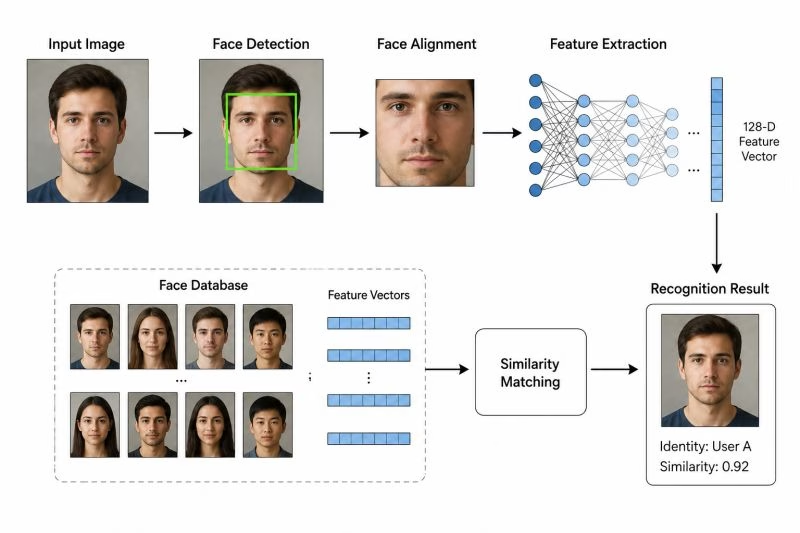
Modern systems convert every detected face into a mathematical representation called an embedding.
Think of an embedding as a digital fingerprint.
Faces that belong to the same person produce embeddings that are very close together.
Different people produce embeddings that are much farther apart.
Our task is simply measuring that distance.
The Complete Pipeline
Probe Image
      │
      ▼
Face Detection
      │
      ▼
Quality Assessment
      │
      ▼
Face Embedding
      │
      ▼
Target Images
      │
      ▼
Embedding Generation
      │
      ▼
Cosine Similarity
      │
      ▼
Rank Candidates
      │
      ▼
Human Review
Notice something important.
AI is assisting the investigator—not replacing them.
The entire code is available in GitHub Repo - https://github.com/debabratapruseth/insightface-image-similarity-pocStep 1 — Set Up the Project
We’ll begin by connecting Google Drive and organising our folders.
Input/
Test Set/
Output/- Input contains the probe image.
- Test Set contains candidate photographs.
- Output stores investigation results.
A clean folder structure makes projects easier to scale later.
Step 2 — Install the AI Model
Instead of training a facial recognition model ourselves, we’ll use InsightFace, one of the most popular open-source face analysis libraries.
It provides:
- Face detection
- Face recognition
- Age estimation
- Gender prediction
- Face embeddings
This allows us to focus on building the application rather than training deep neural networks from scratch.
Step 3 — Detect Faces
Before comparing identities, we first need to locate the face inside each image.
Our model detects:
- Face location (bounding box)
- Detection confidence
- Facial landmarks
If no face is detected, the image is rejected immediately.
If multiple faces are detected, we flag the image for additional review.
This mirrors what production systems often do.
Step 4 — Check Image Quality
Not every photograph is suitable for facial recognition.
Before generating embeddings, we’ll evaluate image quality using simple but effective metrics.
Blur Score
Is the image sharp enough?
Blurry faces reduce recognition accuracy.
Brightness
Is the image too dark or overexposed?
Poor lighting can hide important facial features.
Face Size
Is the detected face large enough?
Tiny faces usually don’t contain enough detail.
Detection Confidence
How certain is the model that it actually found a face?
This helps filter unreliable detections.
Good AI systems don’t just generate predictions—they assess the quality of their inputs.
Step 5 — Generate Face Embeddings
Now comes the magic.
Instead of storing photographs, the model converts every face into a numerical vector.
Think of it like converting a face into hundreds of measurements that uniquely describe it.
These vectors preserve identity while making comparisons efficient.
Step 6 — Compare Faces
Now we compare the probe image against every candidate.
We’ll use cosine similarity, a common technique for measuring how similar two vectors are.
A score close to 1.0 indicates the faces are very similar.
A lower score suggests they are less likely to belong to the same person.
Rather than making a binary yes/no decision, we’ll rank candidates from most to least similar.
Step 7 — Rank the Results
After comparing every candidate, we generate a ranked list.
For each result we record:
- Similarity score
- Match confidence
- Detection quality
- Estimated age
- Estimated gender
- Bounding box location
This gives investigators context rather than just a single score.
Step 8 — Visualise the Top Matches
Numbers alone aren’t enough.
We’ll display the probe image alongside the highest-ranked candidates.
Visual inspection remains one of the most important validation steps.
The investigator can immediately see whether the AI’s ranking makes sense.
Step 9 — Export the Results
Finally, we save everything to a CSV file.
The report includes:
- Ranked matches
- Similarity scores
- Image quality metrics
- Detection statistics
- Metadata
This creates an auditable record that can be reviewed later.
Experiment Yourself
Now that the pipeline works, try extending it.
Beginner
- Test different photographs of yourself.
- Compare family members.
- Add more candidate images.
Intermediate
- Detect multiple faces in a group photo.
- Adjust similarity thresholds.
- Compare CPU versus GPU performance.
Advanced
- Store embeddings in a vector database such as FAISS.
- Build a searchable face index.
- Create a simple web application with Streamlit.
- Integrate with a Retrieval-Augmented Generation (RAG) system to explain why a match was ranked highly.
These are the kinds of enhancements that take the project from a notebook to a production-ready prototype.
What This Project Cannot Do
Face recognition is powerful, but it has important limitations.
This project should not be used:
- As the sole basis for identity verification.
- For law enforcement decisions without proper oversight.
- Without considering privacy, fairness, and regulatory requirements.
- On poor-quality images where confidence is low.
Modern AI systems are decision-support tools, not decision-makers.
Human judgment remains essential.
Where This Is Used
Similar workflows are used in many industries:
- Financial crime investigations
- Border control
- Airport security
- Identity verification
- Digital onboarding
- Fraud detection
- Missing person investigations
- Secure building access
While implementations differ, the underlying concepts—face detection, embeddings, similarity scoring, and human review—are common across many production systems.
Key Takeaways
In this project, you built a complete AI-assisted face verification pipeline.
Starting with a single probe image, you detected faces, assessed image quality, generated facial embeddings, compared candidates using cosine similarity, ranked the results, and exported an investigation-ready report.
More importantly, you learned a key lesson in applied AI: the value of a system lies not just in making predictions, but in producing transparent, explainable outputs that help humans make better decisions.
Next Project
Next, we’ll build an AI-powered document intelligence system that can read passports, invoices, or contracts, extract structured information, and answer questions using large language models and Retrieval-Augmented Generation (RAG).
Want to learn more about everyday use of AI?
Discover more from Debabrata Pruseth
Subscribe to get the latest posts sent to your email.