How AI Agents Remember: A Beginner’s Guide to Memory, Embeddings and Vector Databases
How do AI agents remember conversations, retain user preferences and retrieve relevant information across interactions?
In this beginner-friendly guide, we explore how AI agent memory works, starting with the fundamentals of short-term and long-term memory. We explain key concepts such as chunking, embeddings, vector databases, semantic search, cosine similarity and vector indexing, using simple, real-world examples.
We then move from concepts to practical implementation, exploring how industry-leading frameworks like LangChain and LangGraph work with Azure services, including PostgreSQL with pgvector, Redis and Azure AI Search, to build memory-enabled AI agents. We’ll also look behind the scenes to understand how agents store and retrieve memories, invoke embedding models and use retrieved context to generate more relevant responses.
Finally, we explore Mem0, a dedicated AI agent memory solution, and examine what additional value it brings through automated memory extraction, organisation and retrieval — and when it makes sense to use it alongside existing agent frameworks and databases.
By the end, you’ll have a clear understanding of how AI agent memory works, the technologies that power it, and how these components come together in a practical architecture.
Introduction: Can AI Agents Actually Remember?
Imagine you’re having a conversation with an AI investment research assistant.
You ask:
You: “What is our outlook on US equities?”
The assistant provides a summary of the market outlook.
You follow up:
You: “What are the major risks?”
The assistant understands that you’re still talking about US equities, even though you didn’t mention them again.
You continue:
You: “Summarise both in three bullet points.”
The assistant combines the earlier discussion into a short summary.
Now imagine telling the assistant:
“Remember that I prefer short investment summaries and primarily work with Singapore wealth clients.”
A week later, you return and ask:
“Can you summarise our latest equity outlook for my clients?”
The assistant remembers your preferences and tailors its response accordingly.
But how does an AI agent remember all this?
Does the AI model store every conversation? How does it find relevant information from thousands of past interactions? And what role do embeddings and vector databases play?
To understand this, let’s start with the basics.
1. What Is Memory in an AI Agent?
An AI agent is a system that uses artificial intelligence to understand requests, make decisions and perform tasks.
A large language model (LLM) helps the agent understand language and generate responses. But the model itself doesn’t automatically maintain a permanent, application-controlled record of every conversation.
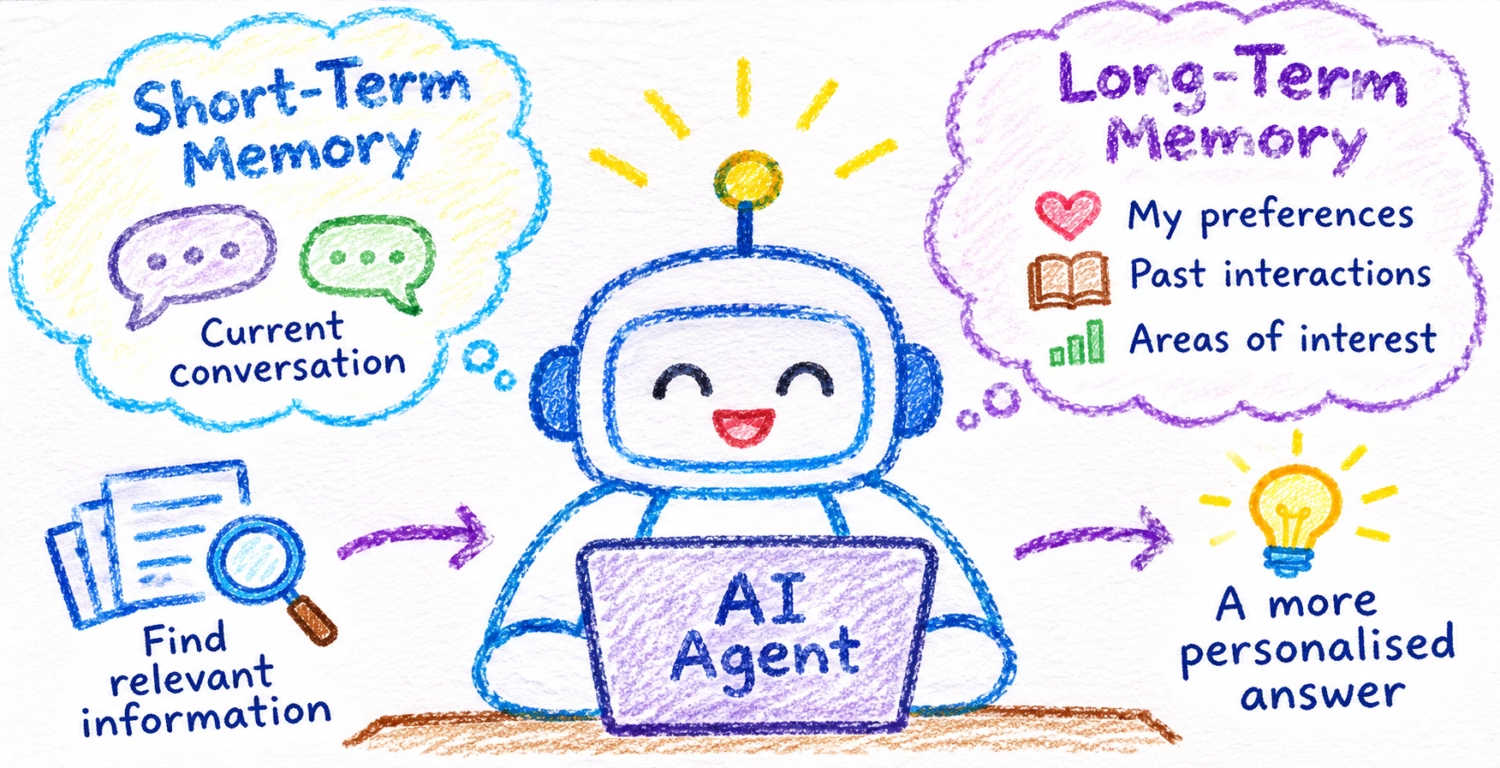
For an AI agent to remember information across interactions, it needs a way to save information, retrieve it when needed and use it in future responses.
This is called AI agent memory.
There are two main types of memory.
1.1 Short-Term Memory: Remembering the Current Conversation
Think of short-term memory as your working notebook.
When you talk to someone, you naturally remember what was discussed a few moments earlier.
An AI agent needs something similar.
Consider this conversation:
User: “What is our outlook on US equities?”
Agent: “The outlook is cautiously positive.”
User: “What are the main risks?”
The agent understands that the second question refers to the earlier discussion about US equities.
It does this because the previous messages are available as context.
Short-term memory helps an AI agent remember the current topic, previous questions, earlier responses and tasks in progress.
How is it stored?
Imagine each conversation has an identifier.
For example:
| Conversation ID | Information |
|---|---|
| C001 | User asked about US equities |
| C001 | Agent provided the market outlook |
| C001 | User asked about investment risks |
When another message arrives under conversation C001, the system can retrieve the relevant history.
There is no need to search millions of records or compare the meaning of sentences.
The system already knows which conversation to retrieve.
1.2 Long-Term Memory: Remembering Across Conversations
Now consider a different scenario.
The user tells the agent:
“Remember that I prefer short investment summaries.”
The conversation ends.
A week later, the user returns and starts a new conversation.
If the assistant can recall this preference, it can use it when preparing the next response.
This is long-term memory.
Think of it as a personal notebook that the agent can refer to in future conversations.
For example:
| User | Stored memory |
|---|---|
| RM001 | Prefers short investment summaries |
| RM001 | Works with Singapore wealth clients |
| RM001 | Interested in Asian equities |
Long-term memory helps the agent retain useful facts, preferences, past decisions and other information across conversations.
However, the agent should not automatically remember everything.
A good memory system needs rules about what to save, what to ignore, how long to retain information and when to remove outdated memories.
1.3 Short-Term vs Long-Term Memory
| Short-term memory | Long-term memory |
|---|---|
| Remembers the current conversation | Remembers information across conversations |
| Maintains the current context | Retains useful facts and preferences |
| Often retrieved using a conversation ID | Often retrieved using a user ID or similarity search |
| Usually contains messages and working information | Usually contains selected facts and summaries |
| Does not normally need embeddings | May use embeddings for semantic search |
The key difference is simple.
Short-term memory helps an agent understand what you’re talking about now. Long-term memory helps it remember what it learned from earlier interactions.
2. How Does AI Memory Work? Embeddings, Chunking and Vector Search Explained
Imagine an agent has stored thousands of memories from previous conversations.
The user asks:
“What investment topics have I previously shown an interest in?”
How can the agent find the right memories?
A traditional search might look for specific words.
But the user may have previously said:
“I regularly follow Asian technology companies.”
The new question doesn’t contain those exact words.
Yet both statements are clearly related.
This is where embeddings and vector search become useful.
2.1 What Is an Embedding?
An embedding is a way of representing information using numbers.
Let’s look at three sentences.
- “I love dogs.”
- “Puppies are my favourite pets.”
- “The stock market crashed yesterday.”
We immediately understand that the first two sentences are related.
The third sentence is about something entirely different.
An embedding model converts these sentences into numerical representations.
For example:
| Sentence | Example embedding |
|---|---|
| I love dogs | [0.81, 0.72, 0.15] |
| Puppies are my favourite pets | [0.79, 0.75, 0.18] |
| The stock market crashed yesterday | [0.12, 0.24, 0.91] |
These are invented numbers for illustration. Real embeddings usually contain hundreds or thousands of numbers.
Notice that the first two representations are similar.
This is the basic idea behind embeddings.
An embedding model converts text into numbers that help computers compare meaning.
2.2 What Is a Vector?
A vector is simply an ordered list of numbers.
For example:
[0.81, 0.72, 0.15]
An embedding is a vector generated by a model.
You can think of these numbers as coordinates on a map.
On a geographical map, two places that are close together have nearby coordinates.
In an embedding space, sentences with related meanings often have mathematically similar representations.
Instead of mapping geographical locations, we’re mapping patterns of meaning.
This allows computers to find related information even when different words are used.
2.3 What Is Chunking?
Now imagine an investment research report containing 40 pages.
It covers several topics, including global economic growth, US equities, Asian equities, interest rates and investment risks.
If we convert the entire report into one embedding, we may lose important differences between these topics.
Instead, we can divide the report into smaller sections called chunks.
For example:
| Chunk | Content |
|---|---|
| 1 | Global economic outlook |
| 2 | US equity market outlook |
| 3 | Asian equity market outlook |
| 4 | Interest-rate expectations |
| 5 | Key investment risks |
Each chunk is converted into its own embedding.
When someone asks about US equities, the system can retrieve the relevant section instead of the entire report.
Does every memory need chunking?
No.
A short memory such as “User prefers concise summaries” can be stored as one record.
Chunking is mainly useful for larger documents, long conversations or content covering several topics.
2.4 What Is a Vector Database?
Once we’ve generated embeddings, we need somewhere to store them.
A vector database stores numerical vectors and supports searching for similar ones.
Imagine these memories:
| Memory | Embedding |
|---|---|
| Interested in Asian equities | Vector A |
| Follows technology stocks | Vector B |
| Prefers concise summaries | Vector C |
The database stores each memory together with its numerical representation.
When the agent needs information about the user’s investment interests, the system searches for the most relevant vectors.
The database doesn’t need to read every sentence like a human.
It compares the numerical representations mathematically.
This is called vector similarity search.
2.5 What Is Cosine Similarity?
Cosine similarity is one common way to compare vectors.
Imagine two arrows.
If both arrows point in almost the same direction, they have high cosine similarity.
If they point in very different directions, their similarity is lower.
The same idea applies to embeddings.
Suppose the agent searches for:
“What investments interest this user?”
The database might return:
| Memory | Example similarity |
|---|---|
| Interested in Asian equities | 0.94 |
| Follows technology stocks | 0.89 |
| Prefers concise summaries | 0.45 |
The first two memories are more closely related to the question in this example.
These scores are illustrative. Cosine similarity measures mathematical alignment, not the probability that a statement is correct.
2.6 What Is Vector Indexing?
Imagine searching for a book in a library with ten books.
You could simply examine every book.
Now imagine the library has ten million books.
Checking every book would take much longer.
A library catalogue makes searching more efficient.
A vector index works in a similar way.
It organises vectors so the database can find nearby candidates without necessarily comparing every stored vector.
Some indexes organise vectors into clusters. Others create connections between nearby vectors.
Different methods balance search speed, memory usage and accuracy.
Remember these three separate capabilities:
| Capability | Purpose |
|---|---|
| Vector storage | Keeps the numerical embeddings |
| Vector indexing | Makes large-scale searching more efficient |
| Vector search | Finds the most similar stored vectors |
Indexing is an optimisation. A database can still perform vector similarity search without a specialised vector index.
3. How Do AI Agents Store and Retrieve Memory?
Now that we understand the basic concepts, let’s follow what happens when an agent saves and retrieves information.
3.1 How an Agent Stores Memory
Suppose the user says:
“Remember that I prefer short investment summaries.”
The agent’s memory workflow follows a process.
First, it identifies the information worth remembering.
In this example, the user has explicitly asked the agent to remember a preference.
Second, it extracts the useful information.
The memory becomes:
“Prefers short investment summaries.”
Third, it converts the memory into an embedding, if semantic search is required.
The embedding model generates a numerical vector.
Fourth, it stores the information.
The memory database saves the readable text, its embedding and details such as the user identifier.
Finally, it updates any relevant search index.
This makes the new memory available for future searches.
The conceptual flow is:
User message → Memory selection → Embedding model → Numerical vector → Memory storage → Index update
Not every memory needs the embedding step.
If the application knows exactly which preference to retrieve, it may simply store and look up that preference as structured data.
3.2 How an Agent Retrieves Memory
A week later, the user asks:
“What investment interests have I previously discussed?”
The system follows another process.
First, it receives the question.
Second, it converts the question into an embedding.
The same embedding model, with compatible settings, should be used for the stored memories and the new question.
Third, it searches the stored vectors.
The database finds memories that are mathematically similar to the question.
Fourth, it retrieves the original memory text.
For example:
“Interested in Asian equities.”
“Follows technology stocks.”
Finally, it provides these memories to the language model.
The model generates a response such as:
“Based on our earlier discussions, you have shown an interest in Asian equities and technology stocks.”
The conceptual flow is:
Question → Embedding model → Vector search → Relevant memories → Language model → Answer
3.3 Who Does What?
It’s useful to separate the responsibilities.
| Component | Responsibility |
|---|---|
| Agent workflow | Decides when to save or retrieve information |
| Embedding model | Converts text into numerical vectors |
| Memory database | Stores and retrieves information |
| Vector search | Finds similar embeddings |
| Language model | Generates the final response |
The embedding model doesn’t generate the final answer.
The database doesn’t decide what the user meant.
Each component has a specific job.
Together, they make the agent capable of remembering and using relevant information.
4. Building AI Agent Memory: LangChain, Redis, PostgreSQL and Azure AI Search
Now let’s connect these concepts to real technologies.
Imagine we’re building the investment research assistant from our earlier examples.
The assistant needs to remember the current conversation, retain user preferences and search investment research documents.
We can build this using Python, LangChain, LangGraph, Redis, PostgreSQL and Azure AI Search.
4.1 What Does Each Technology Do?
| Technology | Role in our AI agent |
|---|---|
| Python | Programming language used to build the application |
| LangChain | Provides interfaces for working with AI models and tools |
| LangGraph | Controls the agent workflow and memory operations |
| Redis | Stores short-term conversation state |
| PostgreSQL | Stores long-term memory |
| pgvector | Adds vector storage, indexing and similarity search to PostgreSQL |
| Azure AI Search | Searches enterprise research documents |
| Microsoft Foundry | Provides access to deployed AI models and agent capabilities |
These technologies complement one another.
They are not all separate types of memory.
4.2 How the Architecture Works
Our investment research assistant uses three information sources.
Redis — Current conversation
Keeps track of messages and working state within the current conversation.
PostgreSQL — Long-term memory
Stores user preferences, facts and other information that should remain available across conversations.
Azure AI Search — Research knowledge
Searches CIO reports and other authorised investment research documents.
The agent can combine relevant information from these sources before generating an answer.
A simplified architecture:
             User Question
                   |
                   v
          LangGraph Agent
                   |
       +-----------+-----------+
       |           |           |
       v           v           v
     Redis     PostgreSQL   Azure AI
   Short-term  Long-term     Search
    Memory      Memory      Knowledge
                   |
                   v
                pgvector
                   |
       +-----------+-----------+
                   |
                   v
            Relevant Context
                   |
                   v
             Language Model
                   |
                   v
               Answer
Redis and PostgreSQL have different memory roles.
Azure AI Search is the research knowledge source.
The agent workflow decides which information to retrieve and use.
4.3 How Redis Handles Short-Term Memory
Suppose the user asks:
“What is our outlook on US equities?”
The agent processes the message and saves its updated conversation state.
When the user asks:
“What are the risks?”
The system retrieves the earlier conversation state.
The agent can then answer the follow-up question with the correct context.
In LangGraph, this is typically handled by a checkpointer.
A Redis-backed checkpointer can persist the conversation state under a thread ID.
It doesn’t need to convert every message into an embedding or perform cosine similarity.
The system already knows which conversation to restore.
Redis is useful for fast access to conversation state. Its actual retention and durability depend on how it is configured.
4.4 How PostgreSQL Stores Long-Term Memory
PostgreSQL is a relational database that can store structured information.
For our agent, it might store:
“User prefers concise investment summaries.”
It can also retain metadata such as the user ID, memory type and date.
One useful PostgreSQL data type is JSONB.
JSONB stores structured information in a format that applications can query efficiently.
For example, a memory record might conceptually contain:
| Attribute | Value |
|---|---|
| User ID | RM001 |
| Memory type | Investment preference |
| Memory text | Interested in Asian equities |
| Source | Previous conversation |
PostgreSQL can store these fields in a structured record or a JSONB document.
JSONB is useful because different memories may have different attributes.
It preserves the structured values, although not necessarily the original formatting or order of JSON object keys.
If the exact original conversation needs to be retained, the application can store its original text or message records separately.
But how does PostgreSQL search memories based on meaning?
That’s where pgvector comes in.
4.5 What Does pgvector Add to PostgreSQL?
PostgreSQL can already store text, numbers, dates and structured data.
The pgvector extension adds the ability to store vectors and perform vector similarity searches.
This gives PostgreSQL three additional capabilities.
1. Vector storage
It can store the numerical embeddings generated by an embedding model.
2. Vector indexing
It can maintain specialised indexes that help find similar vectors efficiently.
3. Vector similarity search
It can calculate distances between vectors and retrieve the nearest matches.
This means PostgreSQL can act as both a traditional database and a vector-search database.
You don’t necessarily need a separate vector database for your agent’s long-term memory.
5. What Happens Behind the Scenes? Memory Storage, JSONB, pgvector and Indexing
Let’s go a little deeper, without getting into detailed programming.
The important question is:
When an AI agent saves or retrieves a memory, what actually happens inside the system?
5.1 Saving a Memory in PostgreSQL
Imagine the user says:
“Remember that I am interested in Asian technology stocks.”
The agent’s workflow identifies this information as a memory worth saving.
LangGraph can invoke a high-level operation called store.put().
Behind the scenes, the following happens:
Step 1: Prepare the memory
The useful information is extracted from the message.
Step 2: Generate an embedding
The configured embedding model converts the memory into a vector.
Step 3: Save the readable memory
PostgreSQL stores the memory content and relevant metadata, often using structured fields or JSONB.
Step 4: Save the vector
pgvector provides the vector data type needed to store the numerical embedding.
Step 5: Maintain the vector index
If a suitable index already exists, PostgreSQL updates it to include the new vector.
The flow is:
LangGraph: Save Memory
          |
          v
      store.put()
          |
          v
    Embedding Model
          |
          v
       PostgreSQL
          |
      +---+---+
      |       |
      v       v
     JSONB   pgvector
    Content   Vector
                |
                v
           Index Update
An important distinction:
pgvector does not generate the embedding.
The embedding model creates the numbers.
pgvector helps PostgreSQL store, index and search them.
Also, storing a new memory does not normally require a full similarity search. It involves saving the data and maintaining any existing index.
5.2 How Does pgvector Indexing Work?
Imagine PostgreSQL contains one million memory embeddings.
When an agent asks a question, the database must find the most relevant ones.
Without a vector index, PostgreSQL can compare the query vector against all eligible stored vectors.
This is an exact nearest-neighbour search.
For large collections, it can become expensive.
A vector index provides a faster way to find likely matches.
One popular technique is HNSW, which stands for Hierarchical Navigable Small World.
The name sounds complicated, but the concept is quite intuitive.
Imagine a network of cities connected by roads.
Instead of visiting every city to find your destination, you follow routes that gradually take you closer to it.
HNSW applies a similar idea to vectors.
It organises vectors into multiple layers of connected points.
During a search, the database uses those connections to navigate towards nearby vectors.
When a new vector is inserted, PostgreSQL maintains the existing index to include it.
You don’t need to rebuild the entire index for every new memory.
Does HNSW always find the exact closest vectors?
Not necessarily.
HNSW is an approximate nearest-neighbour method. It improves search efficiency but may occasionally miss an exact nearest match.
That is the trade-off between speed and search accuracy.
pgvector also supports another indexing method called IVFFlat, which groups vectors into clusters.
For beginners, the key point is that indexing helps PostgreSQL search large collections of embeddings more efficiently.
An index is optional for vector similarity search. It is not created automatically simply because pgvector has been installed.
5.3 How Does PostgreSQL Retrieve a Memory?
Now suppose the user asks:
“What investment topics am I interested in?”
LangGraph invokes store.search().
The process is:
Step 1 — Convert the question into a vector.
The configured embedding model generates the query embedding.
Step 2 — Send the query to PostgreSQL.
The memory store sends the vector and search criteria to the database.
Step 3 — Perform similarity search.
PostgreSQL uses pgvector’s distance operations, such as cosine distance, to rank stored vectors.
It may use an HNSW index to speed up the search.
Step 4 — Retrieve the original memory content.
Once matching vectors are identified, PostgreSQL returns their associated memory records.
Step 5 — Generate the answer.
LangGraph supplies the relevant memories to the language model.
The flow is:
LangGraph: Search Memory
           |
           v
       store.search()
           |
           v
      Embedding Model
           |
           v
       Query Vector
           |
           v
   PostgreSQL + pgvector
           |
           v
    Similarity Search
           |
           v
      Memory Records
           |
           v
      Language Model
           |
           v
          Answer
The important distinction is that the vector helps find the memory, while the original text helps the language model understand and use it.
5.4 What Is the Difference Between JSONB and pgvector?
Both can be used in the same PostgreSQL database, but they solve different problems.
| Feature | JSONB | pgvector |
|---|---|---|
| Stores readable information | Yes | Stores numerical vectors |
| Stores structured memory attributes | Yes | Not its primary purpose |
| Supports filtering by stored fields | Yes | Used alongside SQL filtering |
| Supports semantic similarity search | No, not by itself | Yes |
| Has specialised indexes | Yes, for structured queries | Yes, for vector searches |
Think of JSONB as the structured memory record.
Think of pgvector as the numerical representation that makes semantic search possible.
The two complement one another.
5.5 Does LangGraph Handle These Operations Automatically?
Yes, once the memory store is configured, LangGraph’s PostgreSQL integration can handle the underlying database operations.
For long-term memory, two methods are particularly useful:
| Operation | LangGraph method |
|---|---|
| Save memory | store.put() |
| Search memory | store.search() |
The configured store can handle embedding calls, database writes and vector similarity queries.
You don’t need to implement cosine similarity yourself or write SQL for every memory operation.
However, the agent still needs a policy that determines when to call these functions and what information should be remembered.
LangGraph provides the workflow and storage interfaces. It does not automatically decide that every message should become a permanent memory.
5.6 What About Mem0? Does It Add Anything?
This brings us to another tool worth understanding: Mem0.
Mem0 is a memory-management layer designed for AI applications and agents.
It goes beyond simply storing and searching memories.
Consider this conversation:
User: “I prefer short investment summaries.”
User: “I mainly work with Singapore wealth clients.”
User: “I’m interested in Asian equities.”
Without a dedicated memory-management layer, developers may need to build logic that identifies useful information, extracts memories and handles duplicate records.
Mem0 provides built-in capabilities for these activities.
It can process conversations, extract useful facts, reduce duplicate memories and retrieve relevant information.
For example, Mem0 might extract:
- Prefers concise investment summaries
- Works with Singapore wealth clients
- Interested in Asian equities
These memories can then be embedded and stored in a configured memory backend.
Mem0 does not necessarily replace PostgreSQL or vector search. Its open-source version can be configured to work with different model and storage providers.
It also does not replace the agent’s conversation checkpointer.
One important limitation: automated memory extraction does not guarantee that outdated facts will always be replaced correctly. Applications still need rules for updates, deletion and conflicting information.
5.7 LangGraph vs Mem0: What’s the Difference?
| Capability | LangGraph | Mem0 |
|---|---|---|
| Controls agent workflow | Yes | Not its primary role |
| Supports conversation state | Yes | Not a replacement for checkpointing |
| Provides memory storage and retrieval interfaces | Yes | Yes |
| Automated fact extraction | Requires application logic or an additional component | Built-in |
| Duplicate memory reduction | Requires application logic | Built-in support |
| Semantic memory retrieval | Supported through configured stores | Supported |
| Memory-management focus | General-purpose building blocks | Specialised memory layer |
A simple way to understand the relationship is:
LangGraph controls what the agent does.
Mem0 can help manage what the agent remembers.
PostgreSQL with pgvector stores and searches those memories.
Mem0 is optional. It is not a requirement for building memory-enabled agents.
6. Putting It All Together: A Complete AI Agent Memory Example
Let’s revisit our investment research assistant.
The Relationship Manager asks:
“Summarise our outlook on Asian technology stocks, highlight the risks and keep the response short.”
What happens?
First, the agent retrieves the current conversation context.
It checks whether the user has already discussed related topics in this conversation.
Second, it retrieves long-term memories.
It may find that the user prefers concise summaries and works with Singapore wealth clients.
Third, it retrieves investment research.
It searches the relevant CIO research reports for the latest outlook on Asian technology stocks.
Fourth, it combines the relevant context.
The agent prepares the information needed to answer the question.
Finally, the language model generates the response.
The final answer reflects the user’s preferences while relying on authorised research for investment facts.
A high-level view:
          User Question
                |
                v
          LangGraph Agent
                |
     +----------+----------+
     |          |          |
     v          v          v
   Redis     PostgreSQL  Azure AI
  Current    Long-term    Search
 Conversation  Memory    Research
                |
                v
              pgvector
                |
                v
        Relevant Memories
                |
     +----------+----------+
                |
                v
          Combined Context
                |
                v
           Language Model
                |
                v
       Personalised Response
This is how memory and knowledge retrieval work together to create a more context-aware AI agent.
7. Frequently Asked Questions About AI Agent Memory
Do AI agents remember every conversation automatically?
No. An agent needs a memory system that saves and retrieves information. The application decides what is stored and how it is used.
Does every AI agent need a vector database?
No. Simple conversation history and structured preferences can be stored without vectors. A vector database becomes useful when the agent needs to find information based on meaning.
Do all memories need embeddings?
No. Embeddings are useful for semantic search. If the application knows exactly which record it needs, ordinary database retrieval may be simpler and faster.
What is the difference between short-term and long-term memory?
Short-term memory maintains the context of the current conversation. Long-term memory preserves selected information across conversations.
Can PostgreSQL be used as a vector database?
Yes. With the pgvector extension, PostgreSQL can store numerical embeddings and perform vector similarity searches. It can also store the original memories using traditional relational columns or JSONB.
Does LangGraph automatically manage memory?
LangGraph can automatically persist configured conversation checkpoints and manage database operations through memory stores. Developers still need to define when long-term memories should be created and retrieved.
Do I need Mem0 if I already use LangGraph?
Not necessarily. LangGraph provides the core workflow and memory interfaces. Mem0 can reduce the work involved in extracting, organising and retrieving useful memories from conversations.
Is AI agent memory the same as RAG?
Not exactly.
Retrieval-Augmented Generation (RAG) retrieves external knowledge and supplies it to a language model.
Agent memory can use a similar retrieval process, but its purpose is to retain and recall information from previous interactions, preferences and experiences.
Both approaches can use embeddings and vector search.
Conclusion: What Makes an AI Agent Capable of Memory?
AI agent memory becomes easier to understand when we separate the roles of the different components.
Short-term memory helps agents maintain conversation continuity.
Long-term memory helps them recall information across separate interactions.
Embeddings convert text into numerical representations of meaning.
Vector search helps retrieve related information.
Indexing makes searching large collections more efficient.
Memory databases store the information that agents need to retrieve.
Agent workflows determine when that information should be saved or used.
In a practical system, technologies such as LangGraph, Redis, PostgreSQL with pgvector and Azure AI Search can work together to provide these capabilities. Mem0 can optionally add more advanced memory management.
The most important takeaway is that an AI agent doesn’t remember information simply because it uses a powerful language model.
It remembers because its architecture is designed to save relevant information, retrieve it when needed and provide it to the language model.
That is what makes AI agents more context-aware, personalised and useful over time.
References and Further Reading
- LangGraph — Memory and Persistence
- PostgreSQL — JSON Data Types
- pgvector — Official Documentation
- Microsoft — Azure AI Search Integrated Vectorization
- Mem0 — How It Works
Discover more from Debabrata Pruseth
Subscribe to get the latest posts sent to your email.